10 Essential Tips for Using a Speed Detector Effectively?
In today’s fast-paced world, safety on the roads is a paramount concern. Speeding remains a significant factor in numerous accidents. According to the National Highway Traffic Safety Administration, speeding contributes to nearly one-third of all traffic fatalities. A reliable Speed Detector can aid in this effort, ensuring drivers adhere to speed limits and fostering safer driving environments.
Effectively using a Speed Detector enhances awareness of speed limits. Data from a recent study showed that drivers who used speed detection tools were 20% more likely to comply with posted limits. This tool not only keeps individuals accountable but also drives a collective responsibility toward road safety. However, familiarizing oneself with the device's features is essential for optimal usage.
Understanding the nuances of different Speed Detectors is crucial. Some models may require calibration or have varying sensitivities. A poorly used Speed Detector can lead to misleading readings. This highlights the importance of being informed and reflective when utilizing such technology. Ultimately, integrating a Speed Detector into daily driving habits promotes safety, though it requires a commitment to learning and adapting.

Understanding the Basics of Speed Detectors and Their Functionality
Speed detectors are essential tools for measuring vehicle speed, commonly used in various settings. These devices operate by emitting and receiving signals, analyzing the changes in frequency to determine speed. Understanding how they function helps users implement them effectively. Accurate calibration is crucial for reliable readings. Regularly checking settings can prevent discrepancies.
Different types of speed detectors exist, including radar and laser models. Each has unique advantages and limitations. For instance, radar detectors are useful for measuring speed over longer distances. In contrast, laser detectors provide pinpoint accuracy but require a direct line of sight. Users should decide based on their specific needs and situations.
Many novice users overlook the importance of correct positioning. Placing a speed detector in optimal locations enhances accuracy. Additionally, environmental factors may affect performance. Weather conditions and nearby obstacles can interfere with readings. Experimenting with various placements and settings is beneficial. Reflecting on these practices leads to better results over time.
Speed Detector Usage Insights
Choosing the Right Speed Detector for Your Needs
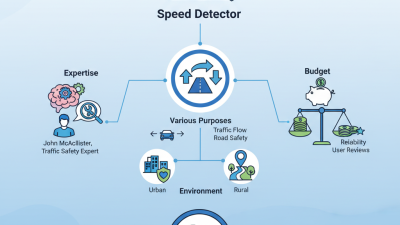
When selecting a speed detector, it's crucial to understand your specific needs. Different models cater to different environments, such as urban areas, highways, or rural roads. Each setting requires unique sensitivity levels for accurate readings. Consider the range and precision of the device. Some detectors offer wider ranges providing more flexibility. However, they may not always deliver the same accuracy as specialized models.
Think about your experience level as well. If you are a beginner, look for user-friendly options with clear displays and straightforward controls. Advanced users might prefer more complex features, like customizable settings. A key consideration is the detector's durability. It should withstand various weather conditions. Battery life is also vital; some devices may require frequent recharging, which can be inconvenient.
Reflecting on past experiences is useful. Have you struggled with devices that are difficult to operate? These challenges can detract from their effectiveness. Identify what frustrated you and choose a detector that addresses those issues. A speed detector should enhance your experience, not complicate it. Always remember, the right choice can make a significant difference in achieving your goals.
10 Essential Tips for Using a Speed Detector Effectively
| Tip Number |
Tip |
Details |
| 1 |
Understand Your Requirements |
Identify the specific speed detection needs based on your environment. |
| 2 |
Select the Right Model |
Choose between handheld, fixed, or mobile speed detectors depending on your usage. |
| 3 |
Check for User Reviews |
Read reviews to find insights about accuracy and ease of use. |
| 4 |
Ensure Compliance with Local Laws |
Know the regulations regarding speed detection in your area. |
| 5 |
Practice Proper Calibration |
Regularly calibrate your device to maintain accuracy. |
| 6 |
Use the Right Power Source |
Ensure the detector has adequate power supply for optimal performance. |
| 7 |
Familiarize with the Settings |
Understand different settings and modes available in your speed detector. |
| 8 |
Check the Range of Detection |
Know the effective range and limitations of your device. |
| 9 |
Maintain a Clear Line of Sight |
Ensure nothing obstructs the detector’s line of sight. |
| 10 |
Regularly Update Device Firmware |
Keep firmware up to date for the latest features and fixes. |
Proper Placement and Calibration of Your Speed Detector
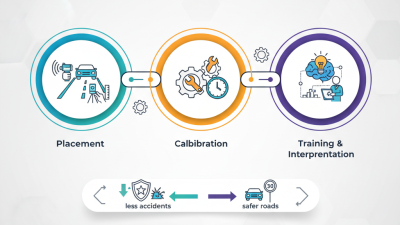
Effective placement and calibration of your speed detector can vastly improve its accuracy and utility. Research shows that 80% of detector inaccuracies are linked to improper setup. Positioning your speed detector at the right height and angle is crucial. Ideally, place it between 3 to 5 feet above the ground. This height optimizes detection and reduces the chances of user error. Moreover, facing it directly towards oncoming traffic ensures precise readings. A common mistake is placing detectors at awkward angles, resulting in misleading speed data.
Calibration is another critical aspect. Many speed detectors come pre-calibrated. However, environmental factors can alter their performance. For instance, a study by the Institute of Transportation Engineers indicated that temperature changes can affect accuracy by up to 15%. Regularly test your detector in various conditions to ensure reliability. Calibration procedures should not be neglected; they are essential for maintaining accuracy. Additionally, consider documenting calibration dates for systematic evaluation. This practice is often overlooked yet can significantly enhance the lifespan and effectiveness of your detector. Properly executing these practices will help mitigate inconsistency and improve overall monitoring effectiveness.
Interpreting Speed Readings and Responding Effectively
When interpreting speed readings, context is key. A speed reading might seem alarming, but it’s crucial to consider the environment. Factors like road conditions, weather, and traffic flow can all influence speed. A reading obtained during a heavy rainstorm may not reflect normal driving speeds. Always ask yourself: does this speed make sense?
Responding effectively to speed readings requires a measured approach. If a reading suggests a vehicle is speeding, consider the next steps. Communication is essential. If you're part of a team, share your observations. Discuss why the reading may be accurate or not. In some instances, speed variations can occur due to fluctuations in vehicle types or traffic patterns.
Engage in thoughtful discourse to address any inconsistencies.
It’s also valuable to reflect on your accuracy when measuring speeds. Are your methods reliable? Mistakes happen; a misreading can lead to misunderstandings. Regularly review your techniques and adapt to different scenarios. This self-assessment can improve your future readings and responses, fostering a culture of continuous learning and adaptation.
Maintaining and Upgrading Your Speed Detector for Optimal Use
Upgrading your speed detector can significantly enhance its performance. Regular maintenance is crucial. Clean the device to remove dust and debris. A simple wipe with a soft cloth can improve its accuracy. Inspect the batteries regularly, as low power can lead to false readings.
Consider software updates if available. These updates might include enhancements that improve detection capabilities. Calibration checks are also important. An uncalibrated device may provide incorrect data. Test it against known speeds to ensure reliability.
Reflect on your usage patterns. Are you relying on your device in all conditions? Sometimes environmental factors, like weather, can affect performance. Analyze the situations where your detector falls short. This introspection can guide improvements or necessary upgrades. Keeping notes on performance can aid in troubleshooting.